
Select the Product
Choose an Individual Character, Library Volume, Category Complete Library, or Master Complete Library. Aoyama Persona displays the exact Product ID that will be checked.
AI Character Library
AI Character Library
Purchase Guide
Purchase Guard checks the exact Product ID before payment. Card and other payment information is entered directly on Gumroad.
Use this guide to verify your purchase email, review the exact Product ID, understand Product overlap, complete Gumroad checkout, keep delivery records, and identify the correct support route if something goes wrong.
Purchase Flow
Choose an Individual Character, Library Volume, Category Complete Library, or Master Complete Library. Aoyama Persona displays the exact Product ID that will be checked.
Enter the email you intend to use for this Gumroad purchase and confirm the six-digit code. The code is time-limited.
Purchase Guard compares the verified email and exact mapped Product ID against the seller’s Gumroad Sales records.
If no matching purchase is found, review the Product ID, listed price, package summary, generation-source information, overlap notice, and Aoyama Persona License Terms before continuing.
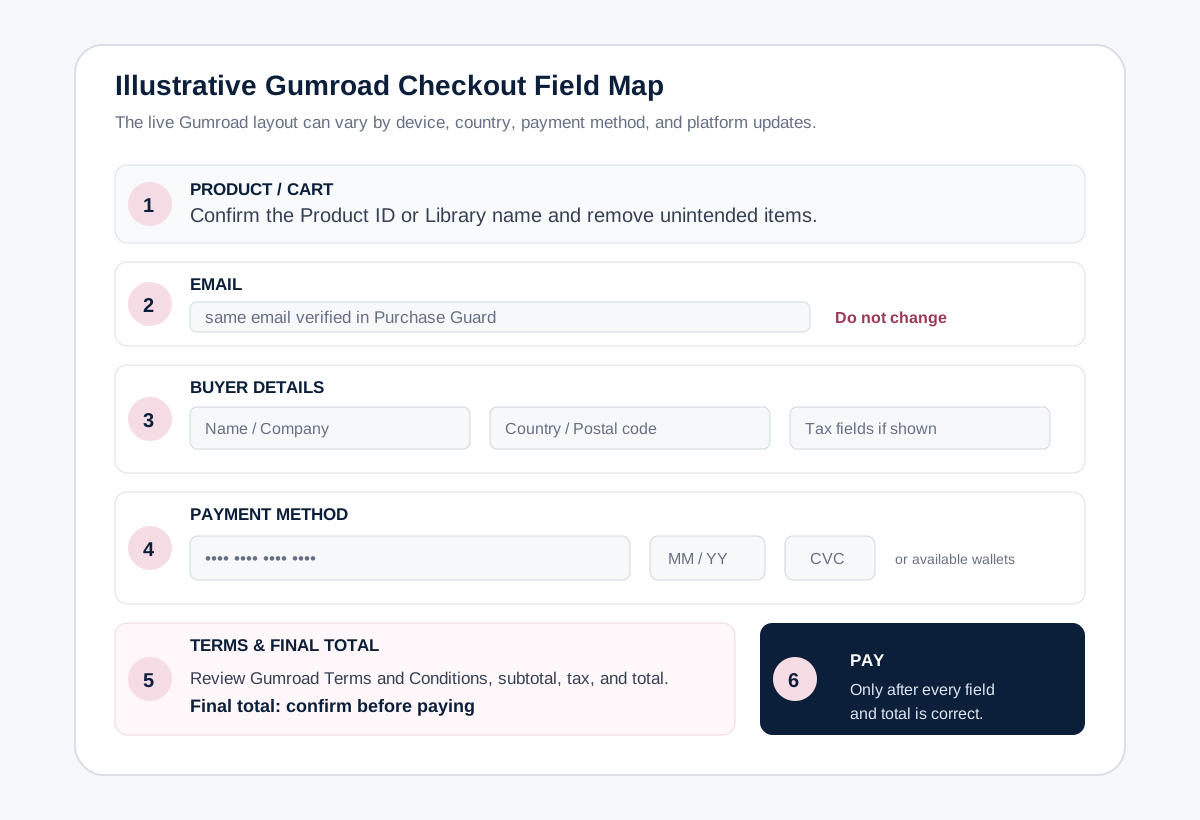
Keep the verified email unchanged, review the live checkout details, including tax, total, payment method, and Gumroad terms, then pay only after the checkout information is correct.
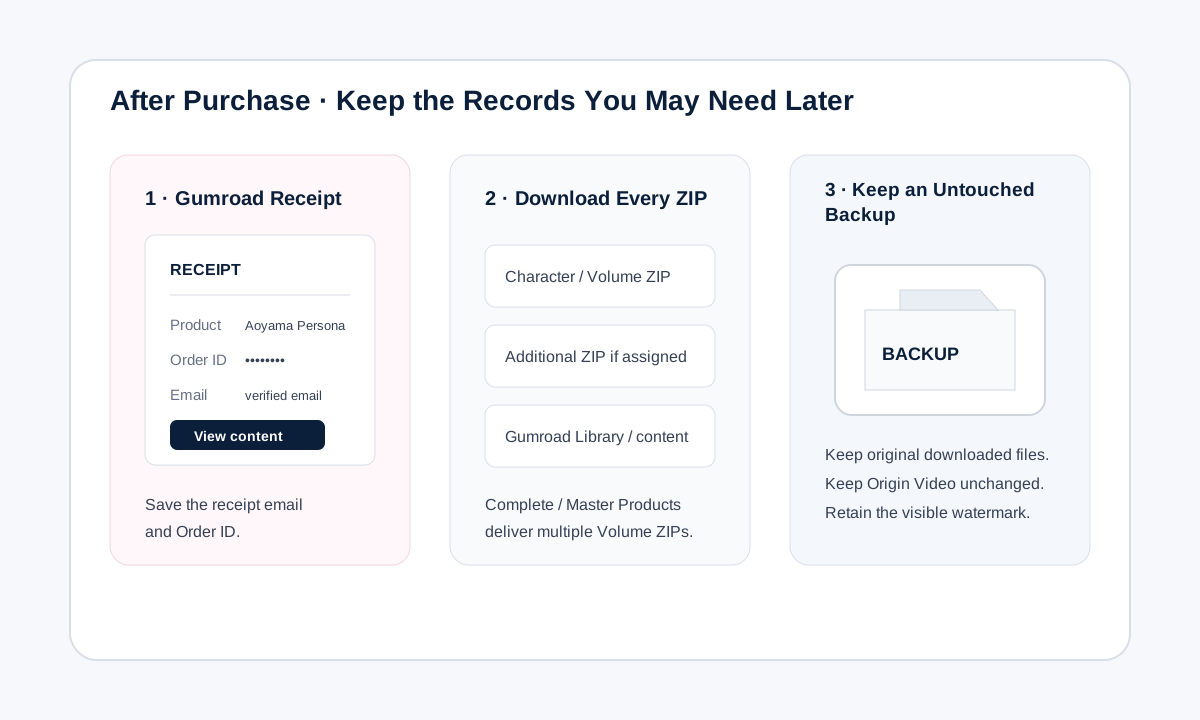
Keep the Gumroad receipt email: its link lets you return to your downloads later. Also save the Order ID, downloaded ZIP packages, and an untouched backup of the delivered files.
Email Verification
Enter an email address you can access and intend to use for the Gumroad purchase. The six-digit code is time-limited, and the verified browser session may remain available temporarily.
After verification, the address is shown in masked form, such as ma••••••77@gmail.com. If you need a different purchase email, select Use another email on the email verification screen, verify that address, and rerun the purchase check before continuing to checkout.
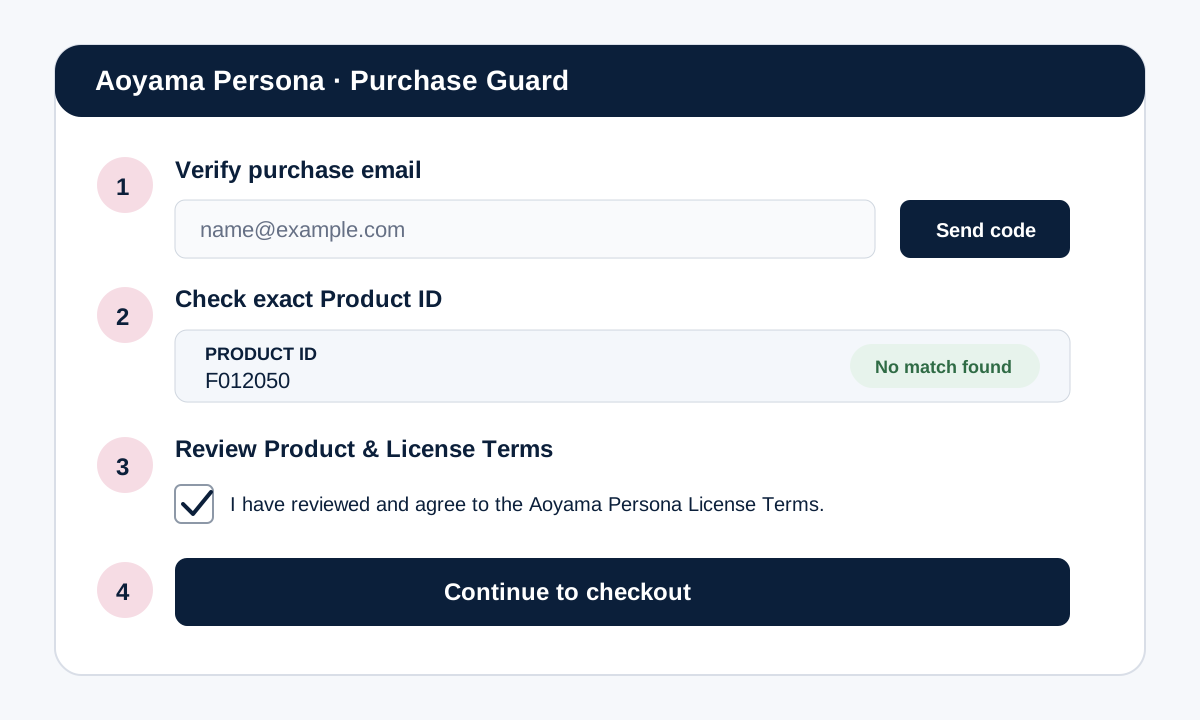
Purchase Check Results
No Gumroad Sales record was found for the verified email and exact Product ID. Review the Product and License Terms, accept the agreement, and continue to checkout.
A matching Gumroad Sales record exists for the same verified email and exact Product ID. Checkout is blocked. Use the existing Gumroad receipt or Library access instead of purchasing again.
Gumroad returned a matching record with a state Purchase Guard cannot safely determine automatically, such as refund, partial refund, dispute, chargeback, cancellation, or a related status. Checkout remains blocked. Gumroad controls that transaction status, so its records and support information are the appropriate sources for review.
A temporary pre-sale lock is active for the same Product ID. If no purchase was completed, return to the relevant Aoyama Persona product page, open Purchase Guard again, and use Cancel checkout & return to release the temporary checkout lock. Otherwise, wait for the lock to expire before trying again.
No payment has started. Retry later and review this Purchase Guide and the FAQ for the current procedure. Purchase Guard procedures are documented on Aoyama Persona, while Gumroad controls its transaction and account statuses.
Product Overlap
For prior-purchase duplicate prevention, Purchase Guard treats the same verified purchase email plus the exact same Product ID as the duplicate-purchase match. Different Product IDs are not treated as duplicate purchases solely because their content overlaps. Other temporary or review states may also prevent checkout.
Overlap between different Product IDs is not treated as a duplicate purchase. Examples include:
F011001 → Library Volume AP-FYA-V01AP-FYA-V01 → Category Complete Library AP-FYA-COMPLETEAP-MASTER-COMPLETEIf you already own related Products, review included content before purchasing a larger Library. A prior Product does not become eligible for a refund, credit, retroactive bundle discount, price adjustment, or deduction solely because a later Library or Set Product includes overlapping content, subject to mandatory law and the applicable Sales Platform terms.
An accidental duplicate charge for the exact same Product is different from content overlap between separate Product IDs. If the same Product appears to have been charged more than once, contact Gumroad Support to request review and any applicable refund or correction of the duplicate charge.
Gumroad Checkout Field Guide
After Purchase Guard approves a supported Product purchase, the checkout page opens in the same tab. The exact Gumroad interface can vary by country, device, payment method, and platform updates. Use the current labels shown in the live checkout.
Gumroad & Payment Security
After Purchase Guard approval, payment information is entered directly on Gumroad checkout, not on Aoyama Persona pages.
Gumroad’s customer documentation explains checkout, supported payment methods, receipt and invoice access, and how buyers can return to purchased content with or without a Gumroad account.
Gumroad states that it acts as Merchant of Record for sales and handles payment processing and applicable sales-tax collection and remittance.
Receipt & Delivery
After a successful purchase, Gumroad sends the receipt email to the address used at checkout. Open its content link to return to the purchased files, then select Download for the ZIP packages you need. You do not need to buy the Product again.
A Gumroad account is not required to complete a normal one-time purchase. Entering an email at checkout is not the same as creating an account. If you have a Gumroad account and the purchase appears in its Library, you can also access it there.
Package Formats
[Character_ID].zip
One ZIP containing the four files for that Character.
[Character_ID]_Origin_Video.mp4[Character_ID]_02_Reference_Face_Front.png[Character_ID]_03_Reference_FullBody_Front.png[Character_ID]_04_Voice_Reference.wavAP-[Category]-V[NN].zip
Category codes: FYA / FMA / MYA / MMA. Volume numbers: 01–04.
Example: AP-FYA-V01.zip
Four existing Volume ZIP packages for that category. No additional combined Complete ZIP is created.
All 16 existing Volume ZIP packages: four FYA, four FMA, four MYA, and four MMA. No additional combined Master ZIP is created.
Privacy & Records
Purchase Guard uses the verified email and exact Product ID to check purchase status before checkout. When License acceptance and protected checkout approval are completed, Aoyama Persona keeps a limited evidence record of the Product, applicable License Terms, checkout approval, and related reference information; where a matching Gumroad sale is linked, limited sale identifiers and status information may also be retained. Payment-card details are not stored by Aoyama Persona. See the Privacy Policy for details.
Support & Security
Aoyama Persona email support handles verified Product-file problems and delivery-completion support for valid purchases, as well as requests concerning personal information handled by Aoyama Persona under the Privacy Policy.
Product IDs, prices, package contents, License Terms, permitted use, and other published information are available on the relevant Aoyama Persona pages.
Use Gumroad’s official support information for Gumroad-controlled transaction or platform functions.
Ready to explore?